
Product
Stock, buying, trucks, money, people and dashboards in one app. What works today is in the app now. Coming next is not built yet.
What it looks like
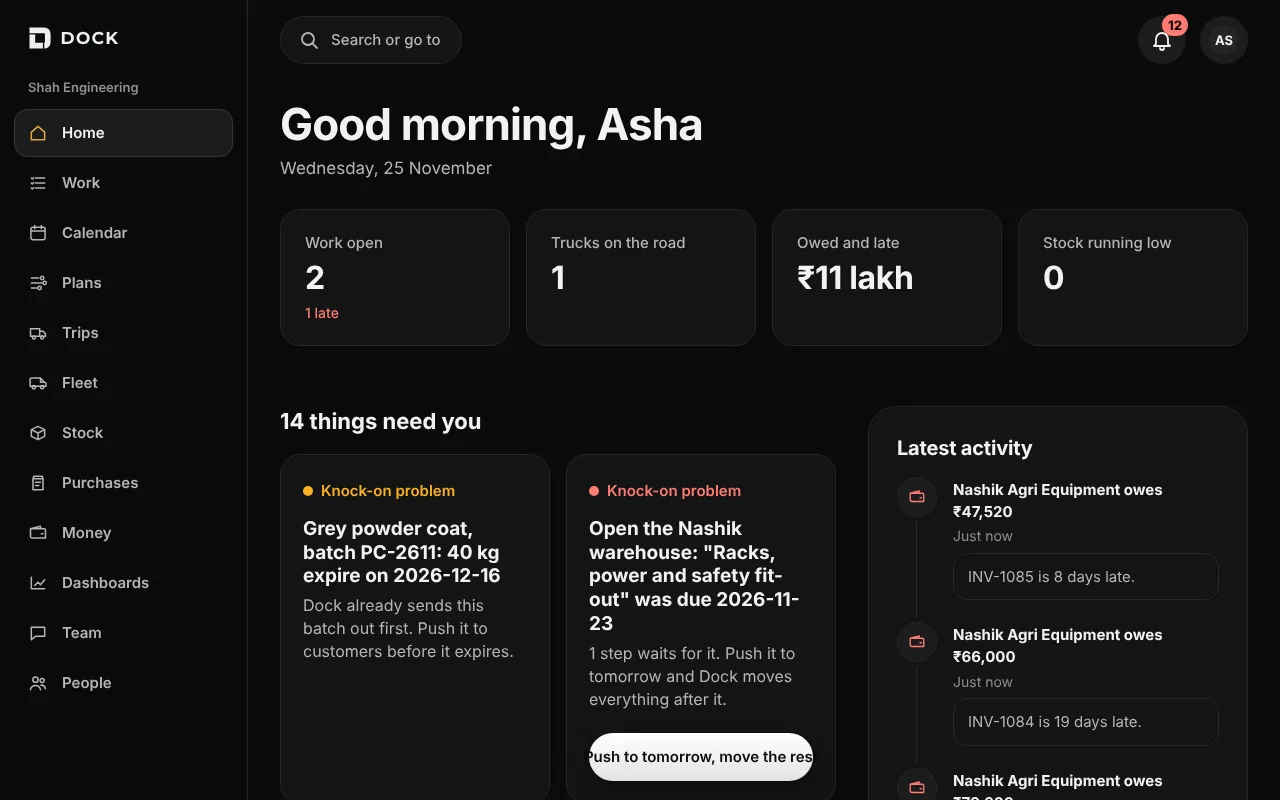
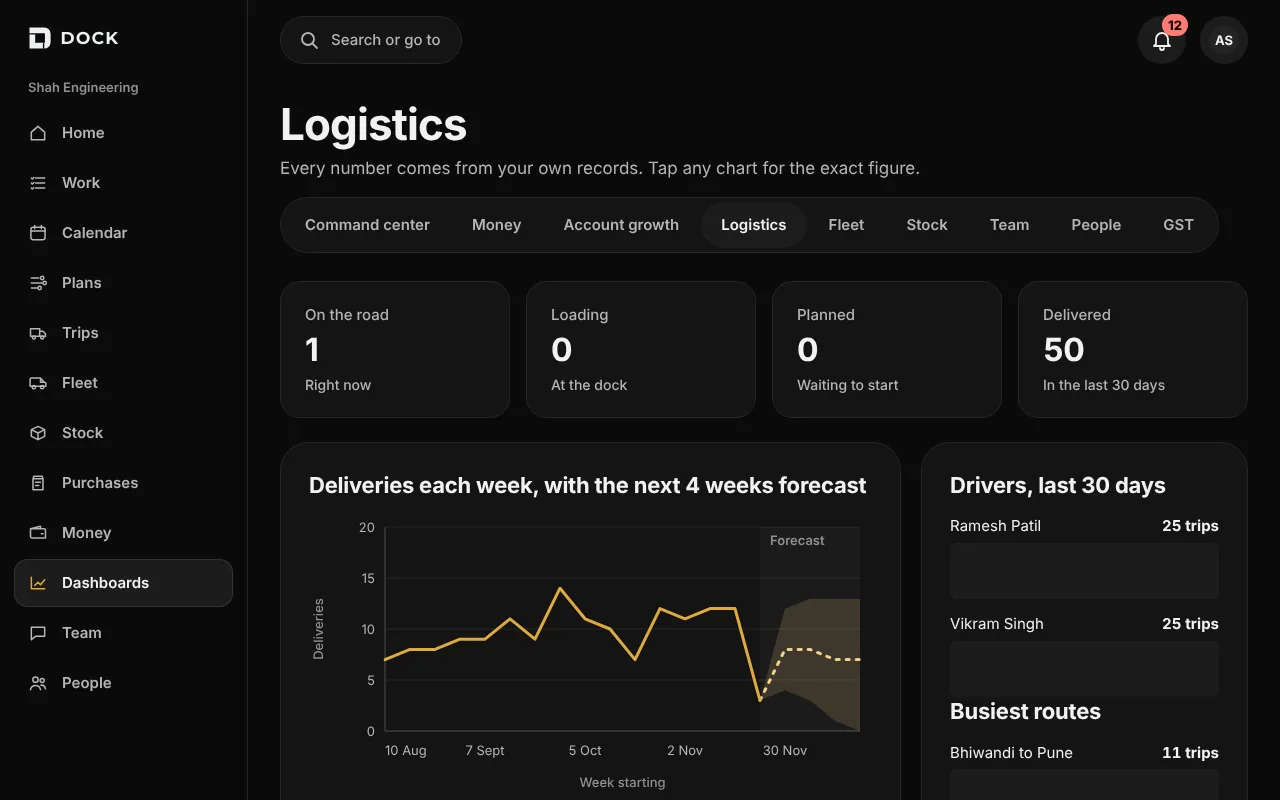
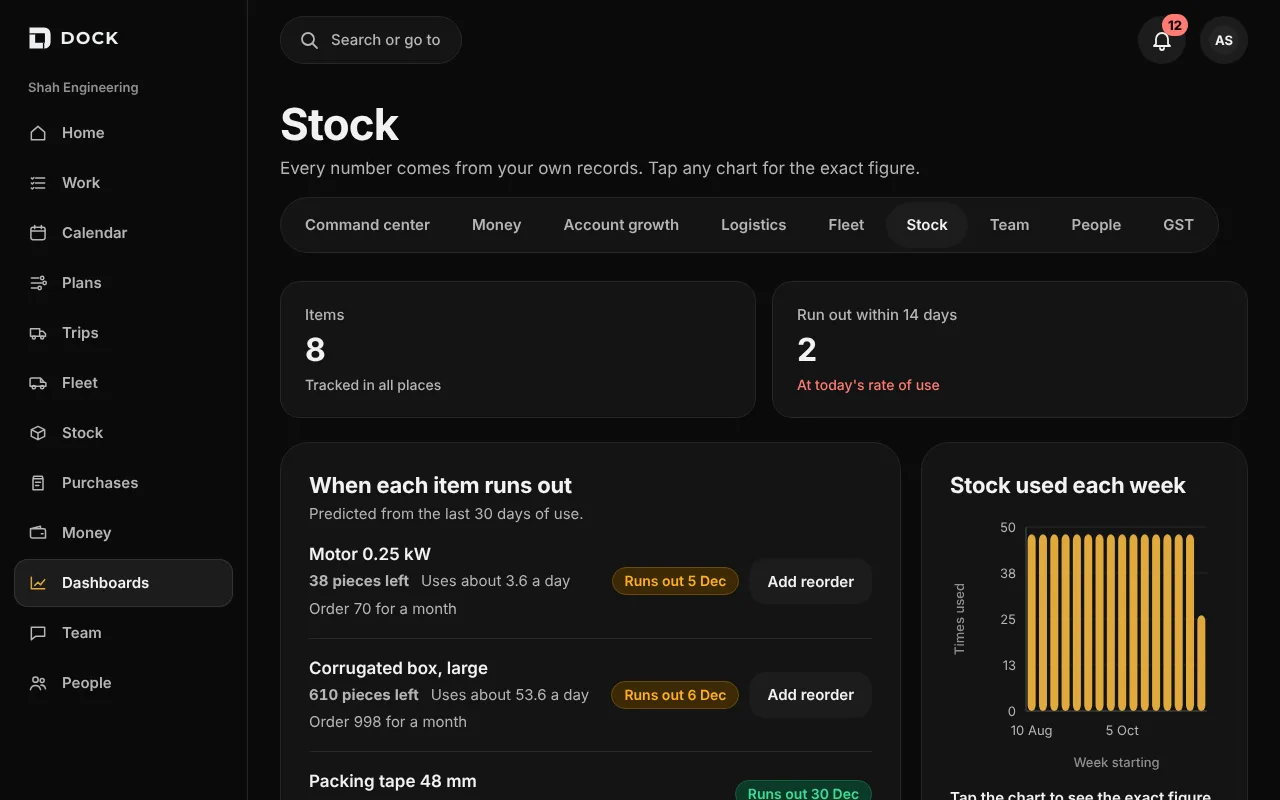
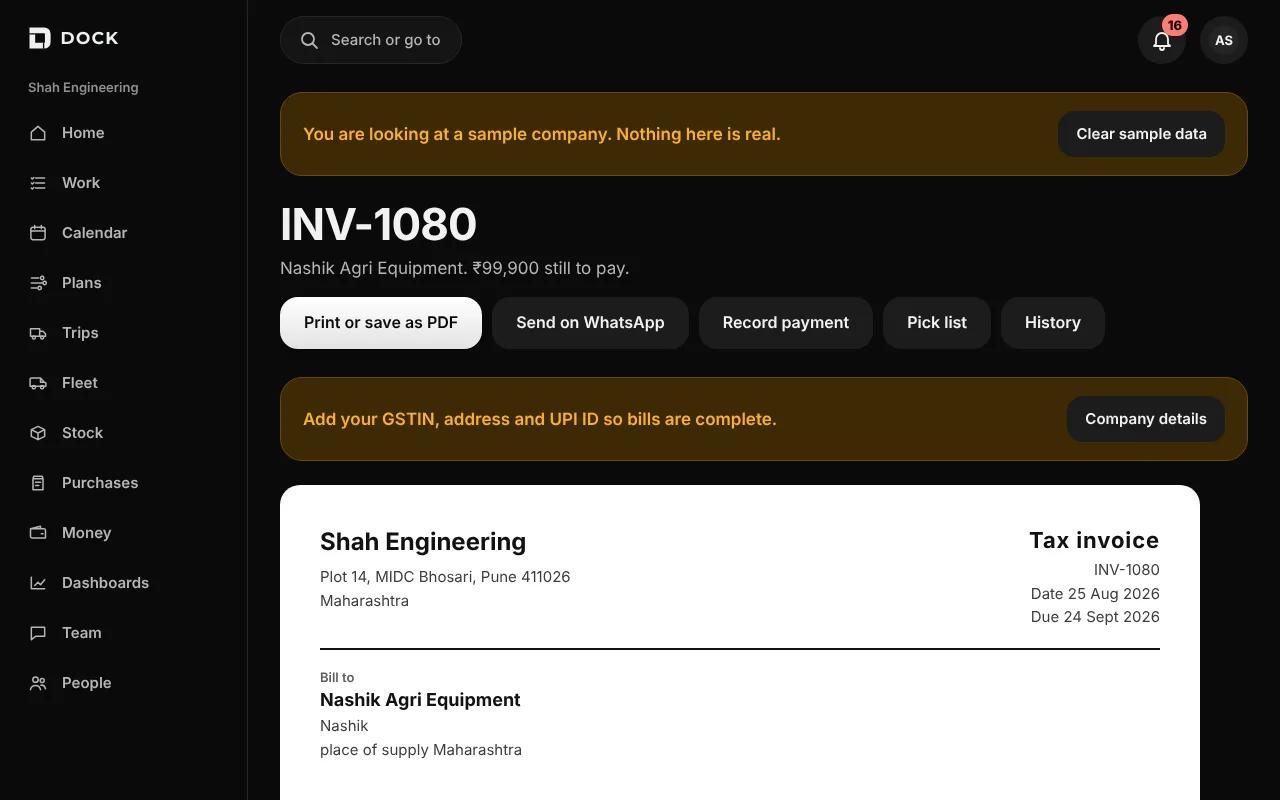
Screens from the Dock app, showing its sample company.
Everyday use
One home screen for the few things that need you.
Works today
- Calendar
- Work due, shifts, leave, deliveries expected, money due and papers ending, on one month.
- Meetings and events
- Create a meeting or event, invite people, repeat it daily, weekly or monthly; invitees reply yes, maybe or no and can add it to their own calendar.
- Plans
- Project plans from a ready template (new warehouse, product launch, new branch, stock audit) with owners, working days and a timeline; a late step moves the steps after it.
- Try it with no sign-up
- A full sample company that opens in one tap, seen as owner, manager, staff or driver.
- Home that prepares your day
- Shows work that is due, late bills, low stock, late deliveries and trucks today, each with one button.
- Search
- Finds any page, person, item or customer from one box.
- Undo and redo
- Takes back the last change, and puts it back.
- Roles
- Drivers see their trips, staff see stock and work, managers and the owner also see money.
- Alerts
- Tells each person when work is handed to them, a truck moves, money arrives, stock runs low or leave is decided.
- Sample company
- Loads six months of sample data to try every screen, then clears it in one tap.
- Larger text
- One switch for bigger text and buttons.
- Phone camera scanner
- Scan a shelf label, item code, serial number or bill with the camera or a barcode scanner, and Dock opens it.
- Serial numbers
- Gives each unit its own serial number at delivery, sells the oldest first, and shows where any unit came from and who bought it.
Coming next
- Indian languagesFirst release
Money
Know who owes you, when they will pay, and bill properly.
Works today
- Small-supplier pay-by dates
- Warns before a micro or small supplier's bill passes 45 days, when the cost stops counting against tax that year.
- Money owed and how late
- Shows every unpaid bill, the days it is late and the total in each age band.
- Predicted pay date
- Works out when each customer will pay from how late they paid before.
- Goods and Services Tax invoices
- Splits Central and State tax or charges Integrated tax by state, with HSN codes and the amount in words.
- UPI pay link on the bill
- Adds your UPI ID and a pay link to every bill still owed.
- Send on WhatsApp
- Opens WhatsApp with the bill and the amount due, ready to send.
- Credit limits
- Warns before billing a customer who would go over their limit.
- Payments
- Records part and full payments against each bill.
- Quotations
- Sends a priced quotation with GST, then turns it into a bill in one tap when the customer says yes.
- Credit notes
- Takes goods returned or a lowered price off a bill, takes the GST off the month's tax, and puts returned goods back in stock.
- Monthly bills
- Repeats a bill every month for rent or contracts, on the same date.
- Second-bill check
- Stops a second bill to the same customer for the same amount within 3 days until you say yes.
- Payment reminders
- Lists who to remind today: 3 days before, on the day, then 7, 15 and 30 days late, each with a WhatsApp message and UPI link.
- Change history
- Shows who created or changed each bill, and when.
- E-invoice and e-way bill files
- Makes the government e-invoice and e-way bill files from each bill, says what is missing first, and prints the IRN and e-way bill number on the bill.
- GSTR-1 file
- Makes the month's GSTR-1 upload file: registered buyers, small sales, credit notes and HSN summary.
- GSTR-2B check
- Reads the GSTR-2B file and lists supplier bills not filed by the supplier, so input credit is not lost.
- Customer account link
- A private link where each customer sees every bill, what is due, and pays by UPI. No sign-in.
- Bank statement matching
- Reads the bank statement file from any Indian bank and matches each payment to its bill or supplier bill, once.
Coming next
- Tally syncFirst release
Stock and buying
Know what you have, where it is, and what to buy next.
Works today
- Stock in every place
- Receives, moves and uses stock across warehouses and godowns, and never below zero.
- Reorder level
- Flags items at or below their reorder level and adds a reorder to your work.
- Run-out date
- Predicts when each item runs out and how much to order for a month.
- Purchase orders
- Turns an order into an expected delivery; receiving it adds the stock.
- Part deliveries
- Receives part of an order and tracks what is still to come.
- Supplier bill check
- Compares the supplier's bill with what actually arrived.
- Paid-twice check
- Stops a supplier bill with the same number, typed any way, or the same amount within 15 days, before it is paid twice.
- Buy what is low
- Tops every low item up to the most you keep, from the last supplier and price, and makes one order a supplier.
- Freight and duty
- Spreads freight, duty and loading over what arrived, so stock value shows what each unit really cost.
- Shipping
- Pick, pack with box weights, and send each bill by your own truck or a courier, with many bills picked in one walk.
- Transfers between places
- Sends stock from one place to another, shows it on the way, and lands it with its batch and expiry.
- Write-offs
- Takes damaged, expired or lost stock out with a reason, and tells the owner.
- Stock value and age
- Values stock at the average price paid and shows how much has sat over 90 days.
- Stock leaves with the bill
- Takes sold items out of stock when the bill is made.
- Bins and racks
- Names every bin, adds a whole row such as A-01 to A-20 at once, and shows what sits in each.
- Batches and expiry
- Tracks each batch with its expiry date and warns 30 days before it ends.
- Pick list
- Picks the earliest-expiring batch first, then by bin, for each order.
- Stock counts
- Counts a place or bin on the phone, shows the difference and corrects stock when approved.
Coming next
- Supplier bill from a photoFirst release
Fleet and delivery
Every vehicle and driver, owned or hired, with the paperwork.
Works today
- Every kind of vehicle
- Scooters, motorbikes, cars, vans, small tempos, pickups, trucks and 18-wheel trailers, each with its own icon and name.
- Owned or hired
- Marks each vehicle and driver as your own or hired, with who you hire from and the rate a trip.
- Paper reminders
- Warns 15 days before insurance, pollution certificate, permit, fitness certificate or a driving licence ends, and again when it ends.
- Driver cards
- Each driver's phone, licence, start date, trips, deliveries, days checked in and sign-ins, with everything they report.
- Private driver details
- Home address and emergency contact, shown to the owner only.
- Fuel, tolls and repairs
- Drivers add spends from the phone; the owner approves in one tap, and each vehicle shows its cost a trip.
- Knock-on problems
- Finds trips on vehicles whose papers ended, drivers on leave, and orders that land after stock runs out, with a one-tap fix.
- Fleet dashboard
- Cost a trip for own and hired vehicles, spend by kind, papers ending and deliveries by driver.
- Alerts on the phone
- Sends an alert to the phone or computer the moment something needs you, even when Dock is closed.
- Trips
- Plans each trip with truck, driver, customer, goods and arrival time, and moves it through four steps.
- Driver phone screen
- Shows a driver only their trips, with one button for the next step.
- Lorry receipt number
- Gives every trip its own lorry receipt number.
- Customer tracking link
- Sends the customer a link that shows the delivery's progress, with no login.
Coming next
- Proof of deliveryFirst release
- Several stops on one tripIn design
- Stop alertsIn design
- Photo at each stopIn design
- Scan papers at a stopIn design
- Checklist at every stopIn design
- Lock and seal tagsIn design
- Live position from the driver's phoneLater
- Route orderLater
People
Attendance, shifts and leave on the phone.
Works today
- Own login for each person
- Gives each person their own login and view.
- Check in and out
- Records each person's day with one tap.
- Weekly shift schedule
- Plans who works where each day, and never books someone on approved leave.
- Leave requests
- Sends requests to the manager, who approves or declines in one tap.
- Work board
- Hands work to people inside and outside the company, with due dates and waiting reasons.
- Team chat
- Channels, direct messages, @mentions, replies, reactions, editing your own message, and booking a meeting from a channel.
- Paid leave allowance
- Sets days a year for paid, sick and casual leave (15, 7 and 7 to start) and shows each person what is used and left.
- Hours report
- Hours clocked, days present, days on leave and days absent for each person, drivers included, for any period.
- Availability
- Each person marks the days and hours they can work.
- Auto schedule
- Fills the week from how many people each place needs and who is available, never booking leave.
Coming next
- Overtime and pay hoursFirst release
- Payroll and provident fundLater
Dashboards and forecasts
Every number comes from your own records. Every chart has a labelled grid and axes, and shows its exact value on tap.
Works today
- Command center
- Sales, money collected, owed, fleet spend, deliveries, stock value, work and attendance in one screen, against the period before, for 7 days to 12 months.
- Live column
- Trucks on the road, deliveries arriving today and every change as it happens.
- Dashboards for each role
- Money, account growth, logistics, stock, team, people and tax for managers; each person sees their own.
- Forecasts
- Money expected and deliveries for the next weeks, with a likely range.
- Heat maps
- Busy and quiet days for money, deliveries, stock and attendance over 26 weeks.
- Account growth
- Shows which customers are growing or shrinking against the last three months.
- Tax view
- Shows the Goods and Services Tax on your bills each month and by rate.
Coming next
- Ask in your languageFirst release
Platform
Works on the phone in your pocket and the screen on your desk.
Works today
- Phone, tablet and computer
- Laid out and tested for phone, tablet and laptop screens.
- Indian formats
- Rupees with lakh and crore, Indian dates and time, GSTIN checks.
Coming next
- Full data exportFirst release
- Works offlineLater
- Data protection checkFirst release
What Dock will not do at launch
- Issue cards or hold money. Your bank does that.
- File Goods and Services Tax returns, e-invoices or e-way bills.
- Track trucks live. This is planned for after the first release.
We will not advertise anything on this page as working until it is built and checked live.